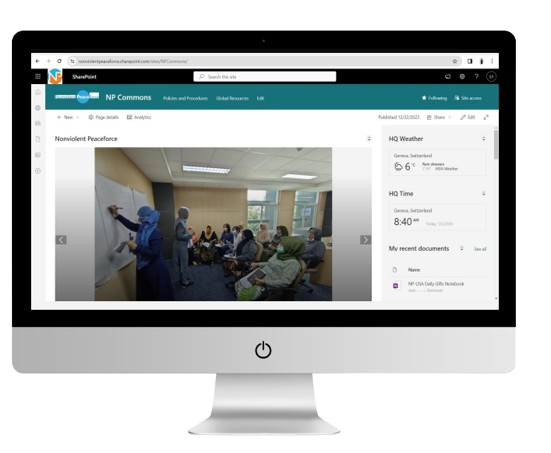
Nonviolent Peaceforce (NP) partnered with Innoventix Solutions to transform its SharePoint environment into a structured, secure, and centrally governed global intranet. The project focused on consolidating hundreds of unmanaged SharePoint sites into a well-organized digital workspace serving approximately 600 users across multiple regions. The solution also included a low-code User Management Automation application that streamlines employee onboarding, updates, transfers, and offboarding through Microsoft Power Apps and Power Automate.
Nonviolent Peaceforce
About the project
Industry
Country
Technologies
Built For
Problem
Nonviolent Peaceforce operated across multiple regions with a growing and unmanaged SharePoint environment. Hundreds of disconnected sites made information difficult to access and created security and administration challenges.
Additionally, employee lifecycle management was handled manually, requiring HR and administrative teams to coordinate multiple Microsoft 365 accounts, licenses, security groups, and site permissions.
Key challenges included:
Unorganized SharePoint sites and scattered documents.
Lack of centralized governance and access controls.
Unrestricted site creation and external sharing.
Difficulty managing permissions across countries and departments.
Manual employee onboarding, transfers, and offboarding.
Time-consuming Microsoft 365 license and security group management.
Limited visibility and auditing of user access.
Solution
1. Global SharePoint Intranet & Governance
We restructured the existing SharePoint environment into a centralized and organized architecture.
Key implementations included:
NP Commons Hub: Created a central hub for organizational policies, HR documents, global resources, and shared information.
Structured Site Hierarchy: Organized 10 Country Program sites, each containing 7 department sites.
Leadership Sites: Established dedicated and restricted-access sites for the Board of Directors, Senior Management Team, and Executive Team.
Group-Based Permissions: Implemented Microsoft Entra ID security groups to manage country and department-level access.
Governance Controls: Restricted site creation and external sharing, with guest access expiring after 60 days.
Permission Reporting: Developed PowerShell scripts to generate SharePoint permission reports for regular access audits.
2. User Management Automation App
Developed a low-code User Management Automation application using Power Apps, SharePoint Lists, and Power Automate.
The application enables HR and administrative teams to manage the complete employee lifecycle from a single interface.
Key implementations included:
Automated employee onboarding and account creation.
Automatic Microsoft 365 license assignment.
Country and department-based security group provisioning.
Employee profile updates and scheduled transfers.
Automated employee offboarding and access removal.
Searchable employee directory with filters.
License availability and assignment tracking.
Validation rules to prevent incomplete or unsupported requests.
Automated notifications and coordination with IT teams.
Challenge
SharePoint Governance: Managing hundreds of previously unmanaged sites while establishing a structured global architecture.
Access Management: Maintaining secure, country-specific and department-specific permissions.
Employee Lifecycle Automation: Coordinating user accounts, licenses, groups, and permissions through automated workflows.
Security & Compliance: Restricting unauthorized external sharing and implementing least-privilege access.
System Synchronization: Ensuring changes to synchronized employee accounts are maintained across Microsoft 365 and on-premises directories.
Key Features
- Global SharePoint intranet and centralized hub.
- Country and department-based site architecture.
- Restricted leadership communication sites.
- Microsoft Entra ID security group management.
- Automated employee onboarding and offboarding.
- Scheduled employee transfers.
- Automated Microsoft 365 license management.
- Searchable employee directory.
- SharePoint permission reporting.
- Controlled external guest access.